LoraAPRS Setup on Togg T10X – A Practical Guide
This article explains the installation of a LoraAPRS system on a Togg T10X vehicle and how it operates on APRS as TA7HBK-3. It covers the hardware selection process, antenna performance comparisons, and practical installation details, providing a clear starting point for amateur radio operators interested in mobile LoRa-based APRS solutions.
AYBERK BLOG
Installing LoRaAPRS on Togg T10X (TA7HBK-3)
Author: Hasan Bahadır Koca (TA7HBK) – This content is shared with attribution.
In this article, I will explain the LoRaAPRS device project in our Togg T10X vehicle and how I set up the system that is actively operating on APRS with the callsign TA7HBK-3. For some time, I have been thinking about how to become more active on APRS, and one of the projects I aimed to implement during this process was integrating a LoRaAPRS system into the Togg T10X. Although I am currently using the LightAPRS Tracker device developed by TA2MUN and TA9OHC, in the future we plan to develop our own device and add many additional features. Some of the ideas include a collision warning system, a system that can retrieve specific data from the vehicle, and even remote control features such as locking and unlocking the car. While some of these projects may remain specific to Togg, most of them are intended to be adaptable to all vehicles.
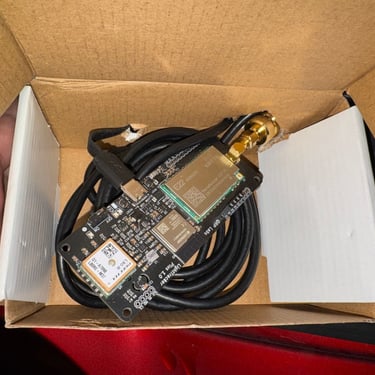
Since we are still at the initial stage, in this article I will only focus on how I set up the current system. In order to learn the system and start with a working device, I preferred to purchase my first LoRa device ready-made. For this reason, I chose the LightTracker Plus, which has 1 Watt output power and includes temperature and humidity sensors as well as a GPS module on a single board. One of the features I liked the most is that the software comes pre-installed and can be configured easily over Wi-Fi without requiring any coding knowledge, allowing it to be used quickly. For these reasons, I can confidently recommend it as a first LoRaAPRS device for amateur radio beginners. It is also worth mentioning again that this device is developed in Türkiye by TA2MUN and TA9OHC. The only downside I can point out is its relatively high price, but hopefully it will become more accessible in the future.
The stock antenna that comes with the device provides acceptable performance in situations where there are no obstacles such as buildings. However, since this device will be used inside a vehicle, I needed better signal performance within the city, especially in areas with dense buildings. Unfortunately, the stock antenna did not perform well in such conditions, which clearly showed how important a high-quality antenna is for a device that will be used continuously in a car.
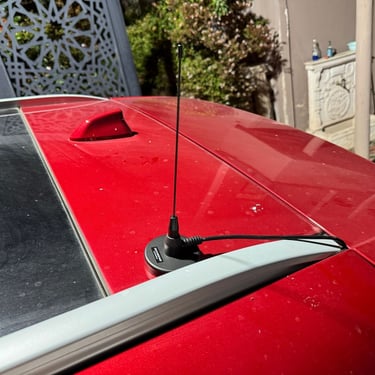
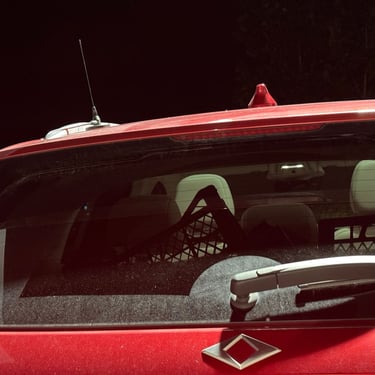
For this reason, I started testing different antenna options. First, I tried a magnetic antenna that I purchased from RFHobi, but it did not provide a significant improvement over the stock antenna. After that, I looked for a better solution and chose the Diamond MC-201 magnetic UHF mobile antenna, mainly because it is easily available in Türkiye and its short length prevents issues when entering places like shopping malls. With a gain specified by the manufacturer as 2.15 dB, this antenna delivered very satisfying performance even in urban environments and between buildings. This experience clearly showed me how effective LoRaAPRS can be when used with the right equipment. If you plan to use this antenna, do not forget to get a suitable adapter connector for your LoRa device since it uses a UHF connector.
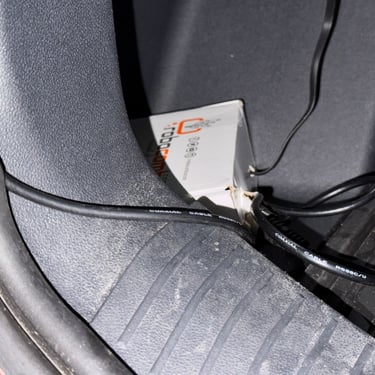
During the installation phase, I had to pay attention to some physical placement details. Since the antenna cable I used is quite thick, routing it through the middle of the trunk caused it to be compressed by the trunk lid. Therefore, considering that the DC power outlet in the trunk is located on the left side, I positioned the antenna on the left side as well and achieved a more reliable installation.
If you have any questions, you can contact the author directly. You can reach out via Telegram using the username @hasanbahadirkoca.
73! TA7HBK Hasan Bahadır KOCA